| Post |
|---|
|
Appcelerator Cloud Push Notification in Android
Push Notification for Android using Appcelerator Cloud Service(ACS) |
| Launch third-party apps from Titanium App
Launch iOS Native(Map,Settings,Browser,..etc)/Third-party applications from our Titanium Application |
| Appcelerator Cloud Push Notification in iPhone
Push Notification for iOS using Appcelerator Cloud Service(ACS) |
| Appcelerator Cloud Service Custom Object and Query
Custom Objects using >Appcelerator Cloud Service and Query(Order by, Greater than, Less Than, Equal) the Objects |
| WebView in Appcelerator Titanium
WebView in Appcelerator Titanium with events explanation |

place for titanium learners
Tuesday, August 14, 2012
Top 5 Visited Posts
Here are the Top 5 visited post on titaniumtutorial.com based on Google Analytics stats.

Wednesday, August 1, 2012
YouTube Playlist in Titanium
In this post I am going to discuss about how to fetch YouTube playlist from a channel using Appcelerator Titanium.
YouTube offer API for category, search term, playlist, favorites, subscriptions... etc. Here you can found list of YouTube API
https://developers.google.com/youtube/getting_started
Below API will retrieve the user's playlists. This request does not require authentication
https://gdata.youtube.com/feeds/api/users/userId/playlists?v=2
The above API response containing a playlists feed in XML format.
The response contains a series of <entry> tags, with each entry describing a playlist.
Each entry contains the playlist's title, description, author and modification date as well as
a <content> tag that specifies the URL for retrieving the list of videos in the playlist
Here I am using Apple's YouTube username to fetch their YouTube playlist
In below code I am going to retrieve all the videos in a particular playlist using playlist id.
http://gdata.youtube.com/feeds/api/playlists/playlist_id?v=2
Here you can download the complete working project from my Github Titanium YouTube Playlist
CodeStrong
YouTube offer API for category, search term, playlist, favorites, subscriptions... etc. Here you can found list of YouTube API
https://developers.google.com/youtube/getting_started
Below API will retrieve the user's playlists. This request does not require authentication
https://gdata.youtube.com/feeds/api/users/userId/playlists?v=2
* Here userId represents YouTube username.
The above API response containing a playlists feed in XML format.
The response contains a series of <entry> tags, with each entry describing a playlist.
Each entry contains the playlist's title, description, author and modification date as well as
a <content> tag that specifies the URL for retrieving the list of videos in the playlist
Here I am using Apple's YouTube username to fetch their YouTube playlist
var channelName = "apple";
var loader = Titanium.Network.createHTTPClient();
loader.open("GET", "http://gdata.youtube.com/feeds/api/users/"+channelName+"/playlists?v=2");

loader.onload = function() {
 var doc = this.responseXML.documentElement;
 var items = doc.getElementsByTagName("entry");
 for (var i = 0; i < items.length; i++) {
   var item = items.item(i);
   var playlist_title = item.getElementsByTagName("title").item(0).text;//playlist title
   var vid_count = item.getElementsByTagName("yt:countHint").item(0).text; //video count for this playlist
   var play_list_id = item.getElementsByTagName("yt:playlistId").item(0).text; //play_list_id
 }
};

loader.onerror = function(e) {
 alert("Error:"+e.error);
};

loader.timeout = 10000;
loader.send();
In below code I am going to retrieve all the videos in a particular playlist using playlist id.
http://gdata.youtube.com/feeds/api/playlists/playlist_id?v=2
var loader = Titanium.Network.createHTTPClient();
loader.open("GET", "http://gdata.youtube.com/feeds/api/playlists/" + playlist_id + "?v=2");

loader.onload = function() {
  var doc = this.responseXML.documentElement;
  var items = doc.getElementsByTagName("entry");
  for (var c = 0; c < items.length; c++) {
   var item = items.item(c);
   var thumbnails = item.getElementsByTagName("media:thumbnail");
   if (thumbnails && thumbnails.length > 0) {
     var media = thumbnails.item(0).getAttribute("url"); //thumbnail image
     var title = item.getElementsByTagName("title").item(0).text; //video title
     var videoId = item.getElementsByTagName("yt:videoid").item(0).text; //video id
   }
  }
};

loader.onerror = function(e) {
 alert("Error:" + e.error);
};

loader.timeout = 5000;
loader.send();
 |
| Playlist listing for Apple |
 |
| Video List for Particular Playlist |
CodeStrong
Monday, July 16, 2012
Appcelerator Titanium Chennai Event
Hello Friends,
We are coming back with another Appcelerator Titanium event in Chennai. This time we are coming with "Cross Platform Mobile Strategy", we have two speakers
1. Kevin Whinnery, Chief Technical Evangelist from Appcelerator.
2. Sivakumar Veerappan, CEO from Anubavam.
Agenda:
6:00 P.M: Registration and Networking
6:30 P.M: Introductions to available Cross Platforms, AppC and Titanium framework: by Sivakumar Veerappan, CEO, Anubavam
6:45 P.M: The Appcelerator Mobile Platform: Full Stack, Cross-Platform, and Incredibly Fast: By Kevin Whinnery, Chief Technical Evangelist, Appcelerator
Titanium Mobile has revolutionized mobile development by empowering top-quality native application development for iOS and Android from a single JavaScript codebase. For Appcelerator, this is only the beginning. Our goal is to provide the first and best full-stack development platform for mobile applications. Appcelerator integrates an open source, cross-platform mobile development SDK, cloud services, application analytics, and development tools into the most productive, feature-rich mobile development platform around.
In this session, Kevin will discuss where the Appcelerator platform is today, and where it's going in the future. We will also do a technical deep dive on the latest improvements and additions to the Appcelerator platform, including the core native platforms, mobile web, and cloud services. As always, we'll have plenty of time for Q&A and digging deeper into the features and topics you want to explore.
8:30: Dinner
Date: 18 July 2012
Time: 06:00 P.M to 08:30 P.M
Venue: Fortune Select Palms
You can RSVP for this event here http://www.meetup.com/Chennai-Titanium-User-Group/events/73255942/
Don't forget to confirm your seats before coming..
For more details contact
04465180342, 9994526041
Regards,
Ramkumar Murugadoss
We are coming back with another Appcelerator Titanium event in Chennai. This time we are coming with "Cross Platform Mobile Strategy", we have two speakers
1. Kevin Whinnery, Chief Technical Evangelist from Appcelerator.
2. Sivakumar Veerappan, CEO from Anubavam.
Agenda:
6:00 P.M: Registration and Networking
6:30 P.M: Introductions to available Cross Platforms, AppC and Titanium framework: by Sivakumar Veerappan, CEO, Anubavam
6:45 P.M: The Appcelerator Mobile Platform: Full Stack, Cross-Platform, and Incredibly Fast: By Kevin Whinnery, Chief Technical Evangelist, Appcelerator
Titanium Mobile has revolutionized mobile development by empowering top-quality native application development for iOS and Android from a single JavaScript codebase. For Appcelerator, this is only the beginning. Our goal is to provide the first and best full-stack development platform for mobile applications. Appcelerator integrates an open source, cross-platform mobile development SDK, cloud services, application analytics, and development tools into the most productive, feature-rich mobile development platform around.
In this session, Kevin will discuss where the Appcelerator platform is today, and where it's going in the future. We will also do a technical deep dive on the latest improvements and additions to the Appcelerator platform, including the core native platforms, mobile web, and cloud services. As always, we'll have plenty of time for Q&A and digging deeper into the features and topics you want to explore.
8:30: Dinner
Date: 18 July 2012
Time: 06:00 P.M to 08:30 P.M
Venue: Fortune Select Palms
142, Rajiv Gandhi Salai,
Old Mahabalipuram Road,
Thoraipakkam,
Chennai – 600096
You can RSVP for this event here http://www.meetup.com/Chennai-Titanium-User-Group/events/73255942/
Don't forget to confirm your seats before coming..
For more details contact
04465180342, 9994526041
Regards,
Ramkumar Murugadoss
Wednesday, July 4, 2012
Appcelerator Cloud Push Notification in iPhone
Push Notification in iOS Using Appcelerator Cloud Service
We can implement Push Notification in iOS using Appcelerator Cloud Service in 5 steps.
- Cloud User Login
- Retrieve Device Token
- Subscribe a Channel
- Push Certificates
- Push Configuration
1)Cloud User Login
Create a test user in Appcelerator Cloud Console
My Apps -> Manage ACS -> DEVELOPMENT -> Users
and login with credential. Use below code for cloud user login

    var Cloud = require('ti.cloud');

    Cloud.Users.login({
        login: 'push123',
        password: 'push123'
    }, function (e) {
    if (e.success) {
    var user = e.users[0];
     alert("Loggin successfully");
        } else {
            alert("Error :"+e.message);
        }
    });
2)Retrieve Device Token
You can Retrieve Device Token using below code
    Titanium.Network.registerForPushNotifications({
        types: [
            Titanium.Network.NOTIFICATION_TYPE_BADGE,
            Titanium.Network.NOTIFICATION_TYPE_ALERT,
            Titanium.Network.NOTIFICATION_TYPE_SOUND
        ],
    success:function(e)
    {
        deviceToken = e.deviceToken;
        alert("deviceToken = "+deviceToken);
        registerForPush();
    },
    error:function(e)
    {
        alert("Error: "+e.message);
    },
    callback:function(e)
    {
        alert("push notification received"+JSON.stringify(e.data));
    }
    });
3)Subscribe a Channel
Add following code for channel subscribtion
    Cloud.PushNotifications.subscribe({
        channel: 'demo_alert',
        type:'ios',
        device_token: deviceToken
    }, function (e) {
        if (e.success) {
            alert('Success :'+((e.error && e.message) || JSON.stringify(e)));
        } else {
            alert('Error:' + ((e.error && e.message) || JSON.stringify(e)));
        }
    });
4)Push CertificatesIt is most important part of this Tutotial, Appcelerator Doc clearly expained about how to create push certificates. http://cloud.appcelerator.com/docs/ios#push
Follow this section("Provisioning your Device for specialized Development") to create Development and Production Push certificates. Your certificates should be in .p12 format.
5)Push Configuration
After getting the push certificates(in my case I have created development push certificate), upload it in cloud console.
My Apps -> Manage ACS -> DEVELOPMENT -> Settings -> Apple iOS Push Certificates

Cool.., You have completed Push Notification setup. This time for testing, run the application in iOS device and click the button "REGISTER PUSH NOTIFICATION". You will get 3 alerts continuously.
Then go to My Apps -> Manage ACS -> DEVELOPMENT -> Push Notifications, here you can see "1 iOS clients subscribed to push notifications"

It is time to send push notification, enter the values and hit the button "Send Push Notification" instantly you will receive notification in your iOS device(with default icon and sound)
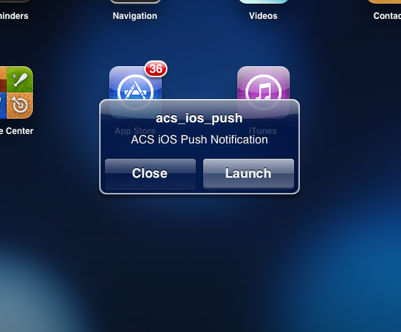 |
| Push Notification in iPad |
 |
| Push Notification Callback |
Here you can download the complete working project from my Github Appcelerator Titanium iOS Push Notification
If anyone found difficulties in push notification implementation feel free to contact me
CodeStrong
Monday, July 2, 2012
Titanium Layout
In Titanium, windows and views have layout property. There are three types of Layout available in Titanium
The first child is laid out top units from its parent's bounding box. Each subsequent child is laid out below the previous child. The space between children is equal to the upper child's bottom value plus the lower child's top value.

All children in a row have the same sandbox height.
Here children are laid out horizontally from left to right, in rows. If a child requires more horizontal space than exists in the current row, it is wrapped to a new row. The height of each row is equal to the maximum height of the children in that row.
- Composite or Absolute (default)
- Vertical
- Horizontal
Composite or Absolute (default)
It is default layout. A child view is positioned based on its positioning properties(top, bottom, left, right and center). If no positioning properties are specified, the child is centered.
var win = Ti.UI.currentWindow;

var label1 = Ti.UI.createLabel({
    text : 'Sample Text 1',
    color : 'blue',
    height : 40,
    width : 180,
    top : 100,
    left : 60,
    font:{fontSize:14, fontWeight:'bold'},
    textAlign : 'center'
});
win.add(label1);

var label2 = Ti.UI.createLabel({
    text : 'Sample Text 2',
    color : 'blue',
    height : 40,
    width : 180,
    top : 160,
    left : 60,
    font:{fontSize:14, fontWeight:'bold'},
    textAlign : 'center'
});
win.add(label2);

var label3 = Ti.UI.createLabel({
    text : 'Sample Text 3',
    color : 'blue',
    height : 40,
    width : 180,
    top : 220,
    left : 60,
    font:{fontSize:14, fontWeight:'bold'},
    textAlign : 'center'
});
win.add(label3);
Vertical
In vertical layout all children are ordered one below the other(top to bottom). All child sandboxes have the same width (set to the parent's width).The first child is laid out top units from its parent's bounding box. Each subsequent child is laid out below the previous child. The space between children is equal to the upper child's bottom value plus the lower child's top value.
var win = Ti.UI.currentWindow;
    win.layout = "vertical";

var label1 = Ti.UI.createLabel({
    text : 'Sample Text 1',
    font:{fontSize:14, fontWeight:'bold'},
    color : 'blue',
    top : 50
});
win.add(label1);


var label2 = Ti.UI.createLabel({
    text : 'Sample Text 2',
    font:{fontSize:14, fontWeight:'bold'},
    color : 'blue',
    top : 50
});
win.add(label2);


var label3 = Ti.UI.createLabel({
    text : 'Sample Text 3',
    font:{fontSize:14, fontWeight:'bold'},
    color : 'blue',
    top : 50
});
win.add(label3);

Horizontal
In horizontal layout all children are ordered next to each other in a row.All children in a row have the same sandbox height.
Here children are laid out horizontally from left to right, in rows. If a child requires more horizontal space than exists in the current row, it is wrapped to a new row. The height of each row is equal to the maximum height of the children in that row.
var win = Ti.UI.currentWindow;
    win.layout = "horizontal";

var label1 = Ti.UI.createLabel({
    text : 'Sample Text 1',
    font:{fontSize:14, fontWeight:'bold'},
    color : 'blue',
    left:10
});
win.add(label1);

var label2 = Ti.UI.createLabel({
    text : 'Sample Text 2',
    font:{fontSize:14, fontWeight:'bold'},
    color : 'blue',
    left:10
});
win.add(label2);

var label3 = Ti.UI.createLabel({
    text : 'Sample Text 3',
    font:{fontSize:14, fontWeight:'bold'},
    color : 'blue',
    left:10
});
win.add(label3);

Subscribe to:
Posts (Atom)